Varnish
Voir :
apt-get install varnish varnish-doc
/etc/systemd/system/varnish.service.d/plop.conf
# To add or override specific settings for the Varnish service, place a copy of
# this file in /etc/systemd/system/varnish.service.d/ with a ".conf" suffix,
# and edit to taste.  See man:systemd.directives for what you can change.
#
# To activate, run:
# * "systemctl daemon-reload"
# * "systemctl restart varnish"

# Add a documentation link to my own system documentation
[Unit]
Documentation=https://doc.example.com/client_a/varnish_service

[Service]
# Clear existing ExecStart= (required)
ExecStart=
# Set a new ExecStart=
ExecStart=/usr/sbin/varnishd -j unix,user=vcache -F -a :80 -T localhost:8080 -f /etc/varnish/default.vcl -S /etc/varnish/secret -s malloc,16g
/etc/varnish/default.vcl
#
# This is an example VCL file for Varnish.
#
# It does not do anything by default, delegating control to the
# builtin VCL. The builtin VCL is called when there is no explicit
# return statement.
#
# See the VCL chapters in the Users Guide at https://www.varnish-cache.org/docs/
# and https://www.varnish-cache.org/trac/wiki/VCLExamples for more examples.

# Marker to tell the VCL compiler that this VCL has been adapted to the
# new 4.0 format.
vcl 4.0;

# Default backend definition. Set this to point to your content server.
backend default {
    .host = "127.0.0.1";
    .port = "8080";
}

sub vcl_recv {
    # Happens before we check if we have this in cache already.
    #
    # Typically you clean up the request here, removing cookies you don't need,
    # rewriting the request, etc.
}

sub vcl_backend_response {
    # Happens after we have read the response headers from the backend.
    #
    # Here you clean the response headers, removing silly Set-Cookie headers
    # and other mistakes your backend does.
}

sub vcl_deliver {
    # Happens when we have all the pieces we need, and are about to send the
    # response to the client.
    #
    # You can do accounting or modifying the final object here.
}
VCL configuration Varnish will automatically append to your VCL file during compilation/loading : \ /usr/share/doc/varnish/examples/builtin.vcl.gz
Deux services :
mkdir /lib/systemd/system/varnish.service.d
#cp -p /lib/systemd/system/varnish.service /lib/systemd/system/varnish.service.d/plop.conf
cp -p /usr/share/doc/varnish/examples/systemd/varnish.commandline.conf /lib/systemd/system/varnish.service.d/plop.conf
vim !$
Varnish admin CLI
#varnishadm -S /etc/varnish/secret -T 127.0.0.1:6082
varnishadm -S /etc/varnish/secret -T 127.0.0.1:6082
Reload Varnish VCL without losing cache data
/usr/local/bin/varnish_reload.sh
#!/bin/bash

TIME=$(date +%s)
varnishadm vcl.load r_$TIME /etc/varnish/default.vcl
varnishadm vcl.use r_$TIME
/lib/systemd/system/varnish.service.d/reload.conf
[Service]
ExecReload=/usr/local/bin/varnish_reload.sh
chmod +x /usr/local/bin/varnish_reload.sh
systemctl daemon-reload

# Now you can reload with :
#systemctl reload varnish
Voir :
VCL
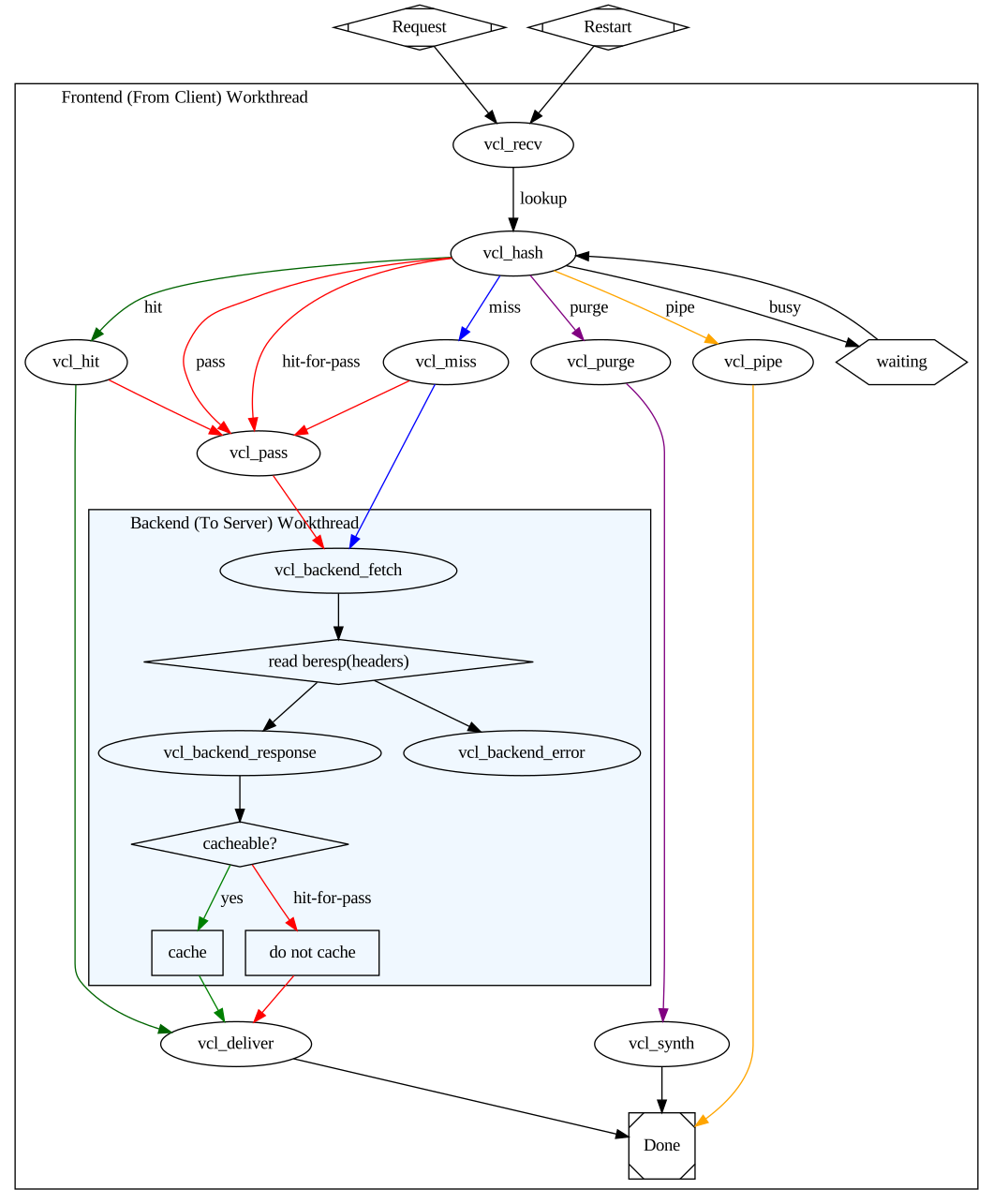
Actions coté client et backend :
vcl_synth)Actions coté client :
vcl_synthvcl_pass)vcl_pipe)Actions coté backend :
vcl_synth)Les Built-in subroutines coté client :
varnishd -d -f /etc/varnish/default.vcl
Pour avoir la command de lancement du daemon avec les arguments :
systemctl status varnish
On enlève le -F et on le remplace par un -d
#sudo /usr/sbin/varnishd -j unix,user=vcache -d -F -a :6081 -T localhost:6082 -f /etc/varnish/default.vcl -S /etc/varnish/secret -s malloc,256m
sudo /usr/sbin/varnishd -j unix,user=vcache -d -d -a :6081 -T localhost:6082 -f /etc/varnish/default.vcl -S /etc/varnish/secret -s malloc,256m
Tapez start pour lancer le service
Vérifier la syntax du fichier VCL
varnishd -Cf /etc/varnish/default.vcl
Changer les headers
sub vcl_deliver {
        unset resp.http.Via;
        #unset resp.http.X-Powered-By;
        unset resp.http.X-Varnish;
        #unset resp.http.Age;
        unset resp.http.Server;
}
curl -X PURGE -H "host: www.example.com" "www.example.com/foo"

# HTTPie
http PURGE "www.example.com/foo"
varnishadm ban req.http.host == example.com '&&' req.url '~' '\\.png$
Architecture :
varnishlog -g raw
varnishstat -l
varnishstat -1 -n varnish_instancename
sudo varnishlog -n varnish_instancename -q 'ReqHeader ~ "Host: plop.fr"'
purge :
sub vcl_recv {
  # Add a unique header containing the client address
  remove req.http.X-Forwarded-For;
  set    req.http.X-Forwarded-For = client.ip;
  # [...]
}